Free ATS-Friendly Resume Templates
An ATS-friendly resume template is a format built specifically to pass applicant tracking systems: single-column, tables-free, with standard section headings that parsers can read reliably. Every template below is free to use inside the Qarera builder with AI-powered bullet rewrites, keyword optimization, and unlimited PDF export. No watermarks, no paywall, no Canva graphics that silently break parsing.
All templates tested against Workday, Greenhouse, Lever, iCIMS, Taleo, and Ashby.
Download Qarera's free, ATS-friendly resume template (Word + PDF) below - no sign-up, no credit card.
Download the ATS-friendly resume template
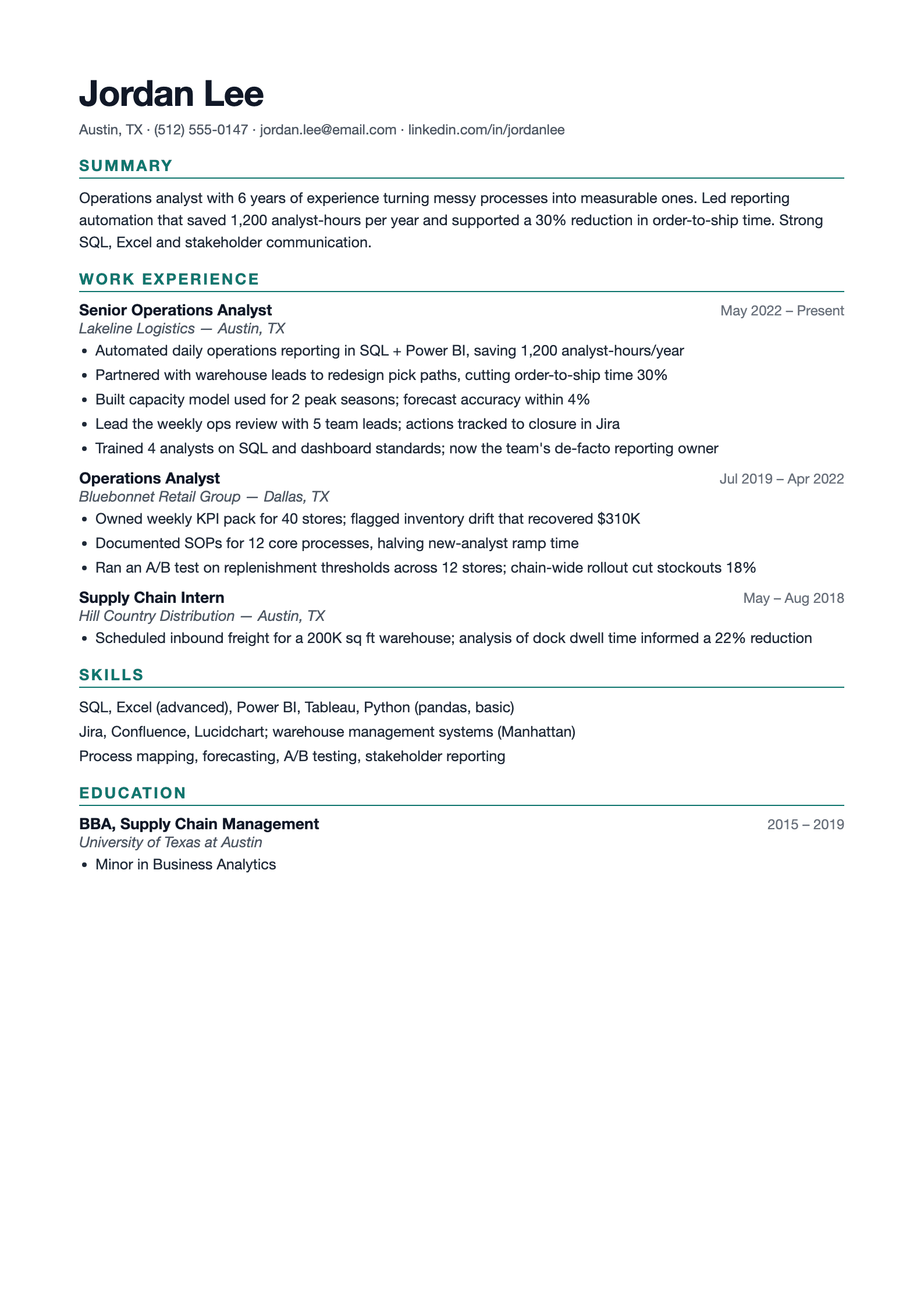
A filled-in Classic Chronological format - Summary, reverse-chronological Work Experience with quantified bullets, Skills and Education. Single column, no tables, parses cleanly in every major ATS. Download the editable Word file or PDF.
Free, no credit card. Bring your own resume and we'll restyle it to this template.
Free · no signup required to download
Pick the template that fits your career stage
Every template below is ATS-compliant. Pick based on where you are in your career, not based on looks.
Classic Chronological
Best for: Traditional industries, 5+ years of experience, steady career progression
Structure: Contact → Summary → Work Experience (reverse-chronological) → Skills → Education
The safest ATS format. Every parser handles it correctly. Recruiters expect this structure and can scan it in 6 seconds.
Modern Minimal
Best for: Mid-career professionals, knowledge workers, tech/SaaS roles
Structure: Contact → Summary → Skills (upfront) → Work Experience → Education → Certifications
Skills-forward layout surfaces the keywords ATS screens for. Clean typography with generous white space. Still single-column.
Entry-Level / New Grad
Best for: Students, recent graduates, career changers, first-time applicants
Structure: Contact → Education → Projects → Internships → Skills → Activities
Leads with education and projects when you don't have 5 years of work history yet. ATS-parseable without forcing you to pad.
Engineering / Technical
Best for: Software engineers, data scientists, DevOps, infrastructure roles
Structure: Contact → Skills (tech stack) → Work Experience → Projects → Education
Technical Skills section appears immediately after contact info. Critical because ATS queries for "Python," "AWS," "Kubernetes" as first-pass filters.
Executive / Senior
Best for: Directors, VPs, C-suite, 15+ years of leadership experience
Structure: Contact → Executive Summary → Core Competencies → Work Experience → Education → Board / Advisory
Longer summary (4-5 lines), quantified leadership achievements, two pages allowed. Still single-column, still ATS-clean.
Career Changer
Best for: People pivoting industries or roles (e.g. consultant → product manager)
Structure: Contact → Summary (reframes story) → Relevant Skills → Work Experience (with outcomes) → Education
The summary reframes your background for the new role. Skills section bridges the gap so ATS still matches target keywords.
What actually makes a resume ATS-friendly
Every item in these lists is the difference between a resume that passes ATS parsing and one that gets auto-rejected.
ATS-friendly checklist
- ✓Single-column layout (no side panels, no tables)
- ✓Standard section headings: Work Experience, Education, Skills, Summary
- ✓Left-aligned text, no centered content blocks
- ✓Simple fonts: Arial, Calibri, Times New Roman, Georgia, Helvetica
- ✓Black text on white background, no colored blocks covering text
- ✓Bullet points using standard Unicode (• or -), not custom icons
- ✓Contact info as plain text, with no icons next to email or phone
- ✓Date formats consistent throughout (e.g., "Jan 2023 - Present")
- ✓PDF export that preserves text selectability (not a scanned image)
- ✓Keywords lifted directly from the job description when relevant
What breaks ATS parsing
- ✗Tables (even invisible ones), since ATS reads them in the wrong order
- ✗Two-column or three-column layouts (content gets scrambled)
- ✗Text inside images, logos, or decorative graphics
- ✗Fancy fonts like Zapfino, Brush Script, or custom display fonts
- ✗Headers and footers containing your name or contact info
- ✗Icons in place of section labels ("📧" instead of "Email")
- ✗Resume templates "optimized for Canva" (often graphics-heavy)
- ✗LinkedIn's default PDF export (good for reading, bad for ATS)
- ✗Word art, text boxes, or WordArt-style formatting
- ✗Photos, unless explicitly required by the country or industry
Why the template actually matters
The most common reason great resumes don't get interviews isn't bad content. It's a template that breaks ATS parsing. A candidate with 8 years of perfect experience uploads a two-column Canva template, the ATS extracts the content in the wrong order, and the recruiter sees a mangled mess of out-of-context fragments. They reject it without reading closely because it "looks unprofessional."
An ATS-friendly template solves this by making the structure predictable. Single column means the parser reads top-to-bottom. Standard headings mean the parser knows "this is Work Experience" and categorizes bullets correctly. Simple fonts mean no character-recognition errors. ATS-friendly templates aren't ugly. They just don't let design decisions sabotage your content.
Once your resume is in a safe template, the content work starts: tailoring bullets, matching keywords, quantifying achievements. But you can't skip to content work if the template is broken. Fix the structure first.
Frequently asked questions
Related tools and reading
Start with a template that actually passes ATS
Free to edit online with AI-powered bullet rewrites and unlimited PDF export.
No watermarks · No paywall · Tested against every major ATS
Build My Resume Free